
23 September 2026
What Is n8n and Why Are Malaysian Businesses Using It for Automation?
Someone, a consultant, a competitor, or a LinkedIn post, used the word “automation” near your business, and now you’re nodding along without really knowing what it means in practice. If “n8n” showed up in that conversation too, here’s the plain-English version, no jargon.
What n8n actually is
n8n (pronounced “n-eight-n”) is a workflow automation tool. In practice, it’s software that watches for something to happen. A form submission, a new email or a payment, and automatically does a sequence of actions in response, without a human clicking through each step.
Think of it as a set of “if this happens, do that” rules, except each rule can chain into several steps: check a condition, pull data from one system, reformat it, send it to another system, and log what happened all in seconds, all without anyone touching a keyboard.
A concrete example, not a buzzword
Here’s what that looks like for a typical SME:
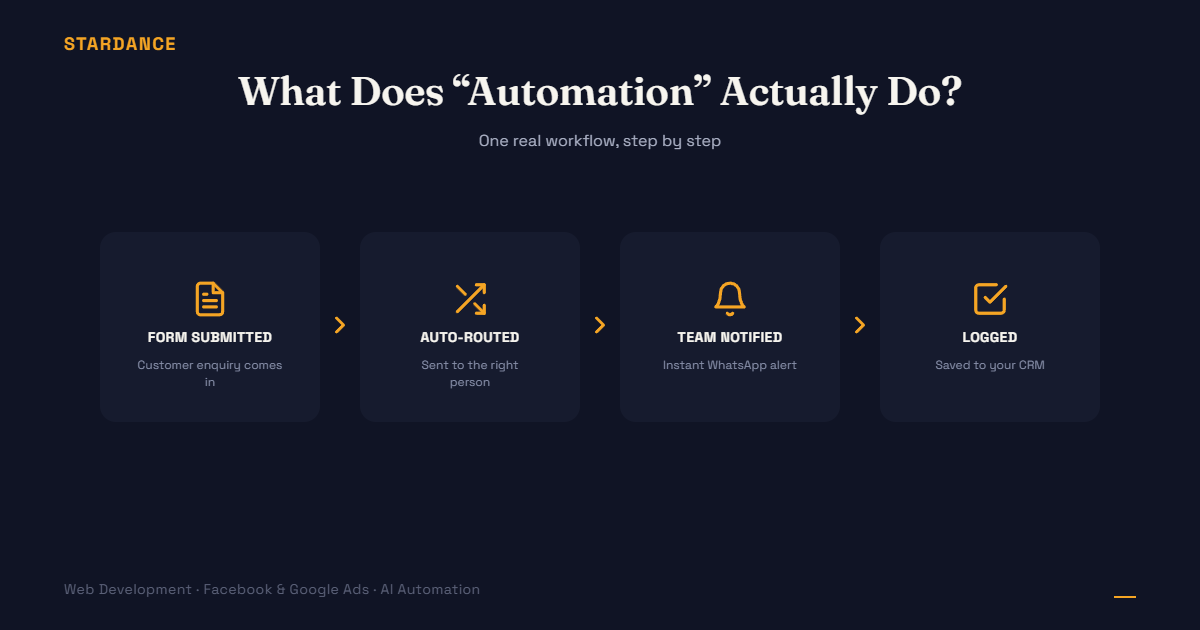
A customer fills out an enquiry form on your website. Right now, maybe that email sits in a shared inbox until someone happens to check it. Could be 10 minutes, could be until tomorrow morning. With an automated workflow, the moment that form is submitted:
- The enquiry details are captured and formatted automatically
- It’s routed to the right person or team based on what the customer asked about
- A WhatsApp or Telegram notification pings whoever’s on point to follow up
- The lead is logged into a spreadsheet or CRM, with no one manually copying and pasting
Nobody built custom software to do this. It’s a workflow, which is a chain of steps configured once, then running quietly in the background every time a form is submitted.
Why n8n specifically (and not just “an automation tool”)
Malaysian SMEs are drawn to it for a few practical reasons:
- It doesn’t require a developer for every change. Workflows are built visually, connecting steps like blocks, so once it’s set up, small adjustments don’t need a full engineering request.
- It connects to tools you probably already use. Google Sheets, WhatsApp Business API, Mailgun, most CRMs, payment gateways… it’s built to talk to hundreds of existing services rather than replacing them.
- It’s a fraction of the cost of custom software. Building a bespoke internal system from scratch to route leads or sync data can run into tens of thousands of ringgit. A workflow doing the same job is typically a setup cost plus a small ongoing hosting fee, because you’re configuring existing building blocks, not writing software from zero.
- It runs on your own server if you want it to. Unlike some automation platforms that only run in someone else’s cloud, n8n can be self-hosted, which matters if you’re handling customer data and want more control over where it lives.
What it’s realistically used for
Automation earns its keep on repetitive, rule-based tasks, not creative or judgment-heavy work. Common starting points:
- Routing inbound enquiries (web forms, Facebook Lead Ads, email) to the right person instantly
- Syncing data between two systems that don’t talk to each other natively (e.g. your booking system and your accounting software)
- Sending automatic follow-ups or reminders without a person triggering each one
- Pulling data from multiple sources into one weekly report instead of someone manually compiling it
What it isn’t
It’s not AI that “thinks” for your business, and it’s not a replacement for a proper CRM or ERP if your operations have genuinely outgrown spreadsheets. It’s the connective tissue that moves information between the tools you already have, reliably, without a person doing it by hand every time.
The real question before you automate anything
Not “should I use n8n” — it’s “which repetitive task in my business currently depends on someone remembering to do it manually, and what does it cost me when they don’t?” That’s the task worth automating first, whatever tool ends up running it.
Curious what a workflow like this would actually look like for your business — lead routing, reporting, or support triage? [See how we build automation workflows →]