
15 October 2026
How to Automate Lead Routing From Your Website and Facebook Forms to Your Sales Team
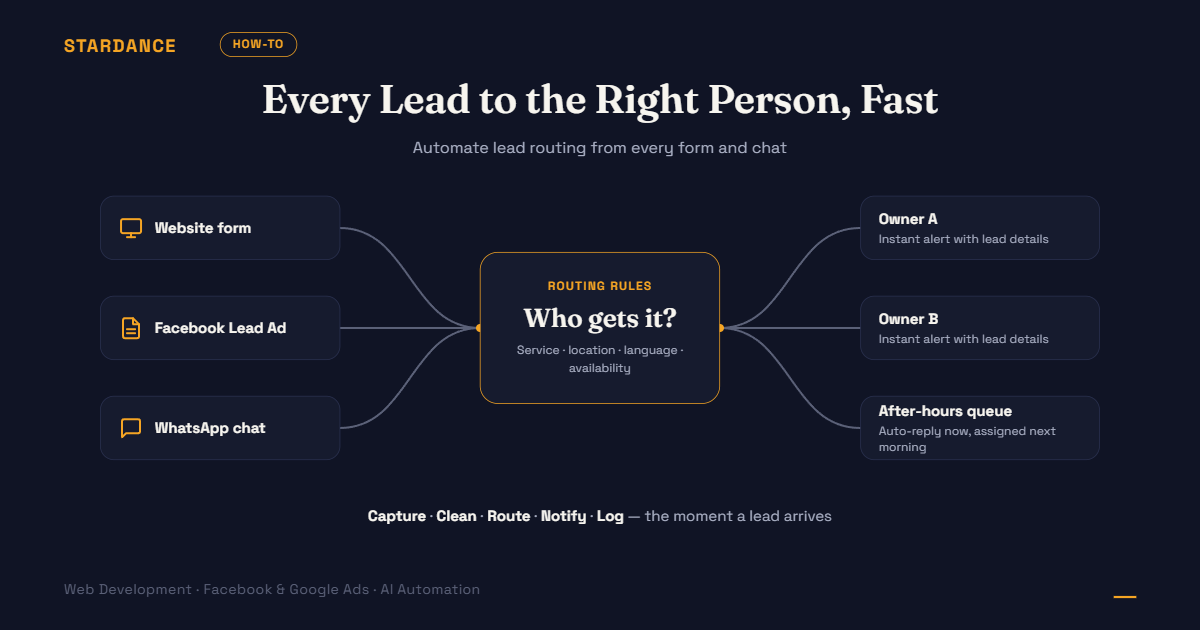
A customer fills in your form at 9:40pm. The enquiry lands in a shared inbox, or in Facebook’s Leads Center, where it sits until someone remembers to check. By the time anyone replies, the customer has already messaged two competitors. You paid for that lead, and the delay is where it was lost.
Lead routing is the fix. It gets every new enquiry to the right person, quickly, with nothing copied by hand.
What lead routing actually is
Lead routing is a set of rules that run the moment an enquiry arrives:
- Capture the lead from wherever it came in
- Clean it up, such as formatting the phone number and flagging duplicates
- Decide who gets it, based on rules you set
- Notify that person where they’ll actually see it
- Log it in one place, so nothing lives only in someone’s chat history
It’s the same idea we described in our post on what n8n is and what automation does. This is one of the most useful workflows to build first, because every business with a form needs it.
Where your leads probably come from
Most Malaysian SMEs have several entry points, and each one needs to feed the same system:
- Website forms: contact page, landing pages, quote requests
- Facebook and Instagram Lead Ads: forms that open inside the app
- WhatsApp: click-to-chat buttons and ad campaigns that open a chat
- Email and phone enquiries, which are harder to automate but can still be logged
- Marketplace and directory enquiries
The first job is a list of every source. Leads from sources nobody lists are the ones that go missing.
Decide the routing rules before you build anything
The tool is the easy part. The decisions are where the value is. Common rules:
| Rule | How it works | Best for |
|---|---|---|
| Round-robin | Leads are shared out evenly in turn | Teams with similar roles and no specialties |
| By service | Web enquiries go to one person, ads enquiries to another | Agencies and multi-service businesses |
| By location | Leads go to the nearest branch or outlet | Multi-outlet F&B, clinics, property |
| By language | Malay, English or Mandarin speakers get matched | Mixed-language customer bases |
| By lead value | Larger budgets or priority services go to senior staff | Businesses with big differences in deal size |
| By availability | Skip people who are away or off shift | Small teams with leave and shift patterns |
| After-hours | Send an instant acknowledgement and queue it for the morning | Anyone whose customers enquire at night |
Most businesses combine two or three. Write them as plain sentences first: “Property enquiries for Mont Kiara go to Aisha. Everything else is round-robin between Daniel and Wei Ling. After 7pm the customer gets an automatic reply and the lead is assigned in the morning.”
A basic workflow, step by step
- A trigger fires. A form is submitted. This is where webhooks matter: they send the lead the instant it’s created, instead of a tool checking every few minutes. (We explain the difference in our FAQ on webhooks.)
- The data is tidied. Names are formatted, phone numbers get the +60 country code, and obvious junk is filtered.
- Duplicates are checked. If the same phone number or email appeared recently, update the existing record instead of creating a second lead.
- The routing rules run, and one owner is assigned.
- The owner is notified by WhatsApp, Telegram, email or Slack, with the customer’s name, number, what they asked about and a link to the record.
- The lead is logged in your CRM or a shared sheet, with the source, time received and assigned owner.
- The customer gets an instant acknowledgement, such as “Thanks, we’ll contact you shortly,” so they know it arrived.
Which tool?
Tools like n8n and Zapier can all do this. The choice comes down to volume, budget and who maintains it, which we compare in our Zapier vs n8n post. For a simple setup at low volume, either works. For more routing rules, higher volume or self-hosting, n8n tends to be the better fit.
The WhatsApp question
Many Malaysian customers prefer WhatsApp to forms, and many salespeople live in it, so alerts and follow-ups often need to go there. Be careful:
- Notifying your own team through a messaging channel is usually simpler than messaging customers.
- Messaging customers automatically through the official WhatsApp Business API has rules, such as approved message templates and conversation-based pricing.
- Unofficial workarounds that automate a personal WhatsApp account risk the number being blocked. We don’t recommend them for business use.
Handle the things that go wrong
A routing workflow that works on a good day and fails silently on a bad one is worse than none, because nobody notices the gaps.
- Missing or invalid phone numbers: flag these for a human instead of dropping them
- The workflow stops: set up an alert so someone is told when a run fails
- Nobody responds: if a lead isn’t contacted within a set time, escalate it to someone else
- Duplicates and spam: filter obvious junk but never silently delete real enquiries
- Backups: keep a log of every lead received, whether or not the workflow succeeded
Mind the personal data
Leads are personal data. Collect only what you need, tell people how it will be used, store it securely, and limit who can see it. If you operate in Malaysia, the Personal Data Protection Act (PDPA) is relevant to how you collect and handle customer information.
Measure it, or you won’t know it helped
Before you automate, record how long it currently takes to respond to a new lead. After, track:
- Time to first contact, from enquiry to first reply
- Contact rate, meaning the share of leads you actually reach
- Leads per person, so the load stays fair
- Cost per lead and conversion by source, which ties routing back to your ad results
If you’re also running paid ads, a high cost per lead often improves without touching the ads once leads are answered faster (see our post on why cost per lead rises).
Common mistakes
- Automating before the rules are agreed, so the workflow just speeds up confusion
- Sending every alert to everyone, until people ignore it
- Forgetting after-hours leads
- No fallback owner when someone is on leave
- Building it once and never checking that it still runs
A 30-minute plan before you build
- List every place leads come from.
- Write your routing rules in plain sentences.
- Pick one notification channel your team will actually watch.
- Decide where all leads will be logged.
- Measure your current response time, so you can compare later.
Want enquiries from your website, Facebook forms and WhatsApp reaching the right person within seconds, with tracking built in? [See how we build automation workflows →]